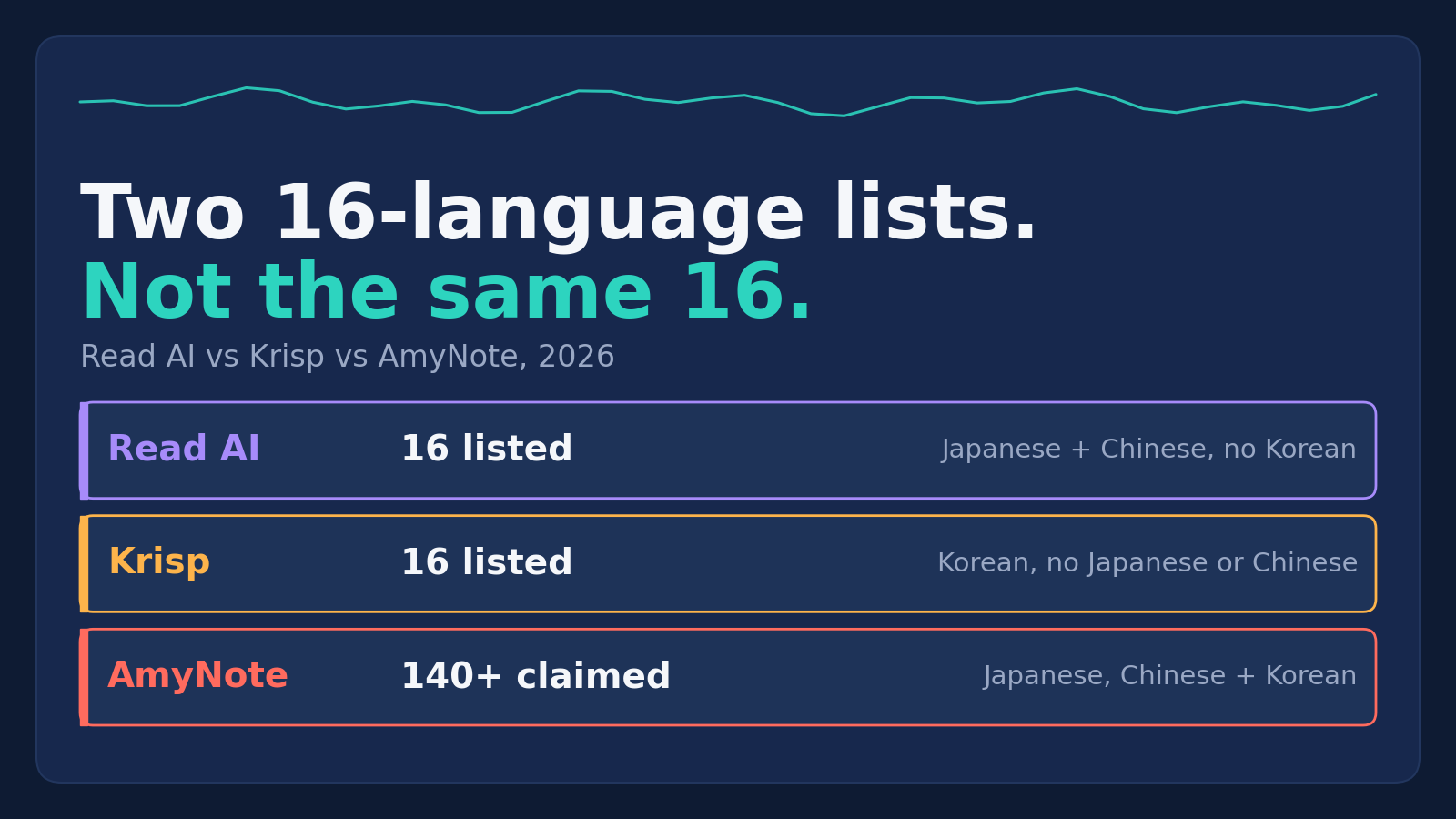
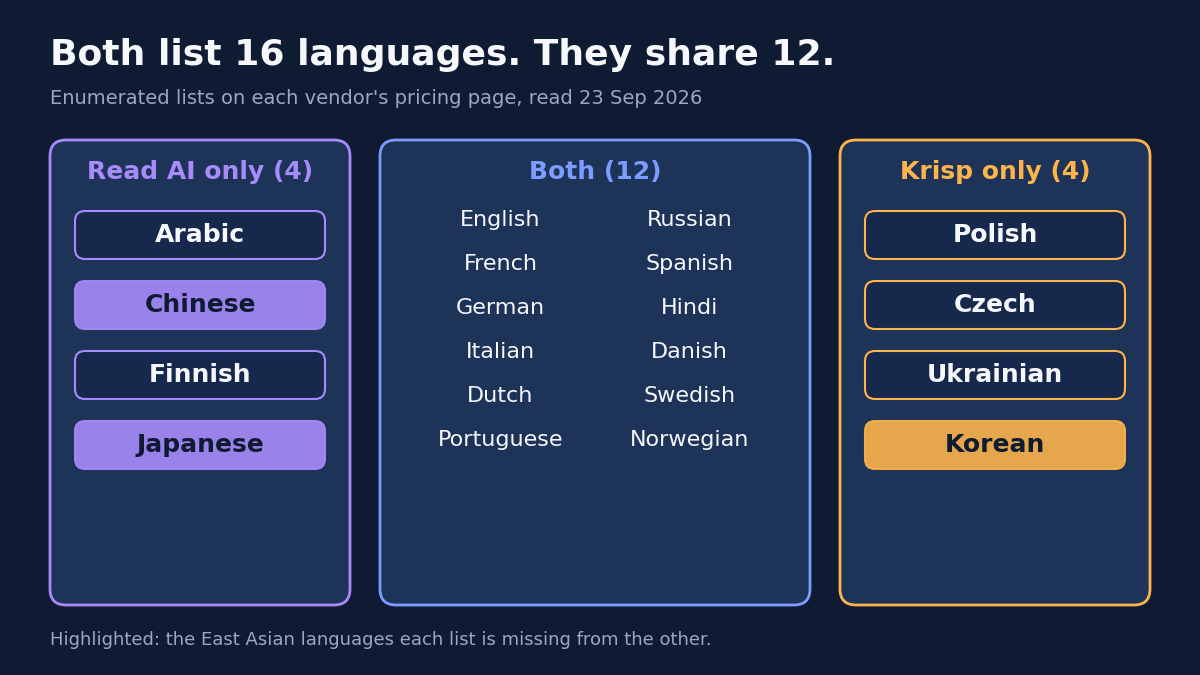
Read AI and Krisp each name sixteen languages on their pricing pages. Put the two lists side by side and they share twelve. Read AI has Japanese and Chinese but no Korean. Krisp has Korean but no Japanese or Chinese.
If your meetings switch between English and an Asian language, that gap matters more than any other feature on either product. A note-taker that does not list the language your client speaks is not a slightly worse note-taker for that meeting; it is not a note-taker for that meeting at all. And because both vendors print the same number, sixteen, a buyer skimming two pricing pages could reasonably conclude they are interchangeable on language. They are not. Every figure below was read off the vendors’ own pages on 23 September 2026.
Quick Verdict
- Read AI if your languages are on its list, you want a permanent free plan, and you are comfortable with a bot that scores everyone in the call.
- Krisp if you want the cheapest paid plan here, noise cancellation built in, and your team speaks Korean or Central European languages rather than Japanese or Chinese.
- AmyNote if you work in more languages than either list covers, you are on an iPhone, and you do not need an enterprise compliance package.
What We Compared
All three handle English. The differences start outside it, so this comparison looks at three narrower questions.
- Which languages are actually listed. Not the headline number, but the enumerated list each vendor publishes.
- Whether the headline matches the list. Both competitors print a bigger number in their marketing than on their own pricing page.
- What happens to non-English audio. One vendor handles it differently from English, and says so only in its privacy policy.
The first question is the one that decides fit, and it is easy to answer wrongly. A headline number tells you how many languages a vendor is willing to claim; the enumerated list tells you which ones. Two vendors can print the same number and cover different markets entirely, which is exactly what happens here.
Read AI: Japanese and Chinese, No Korean
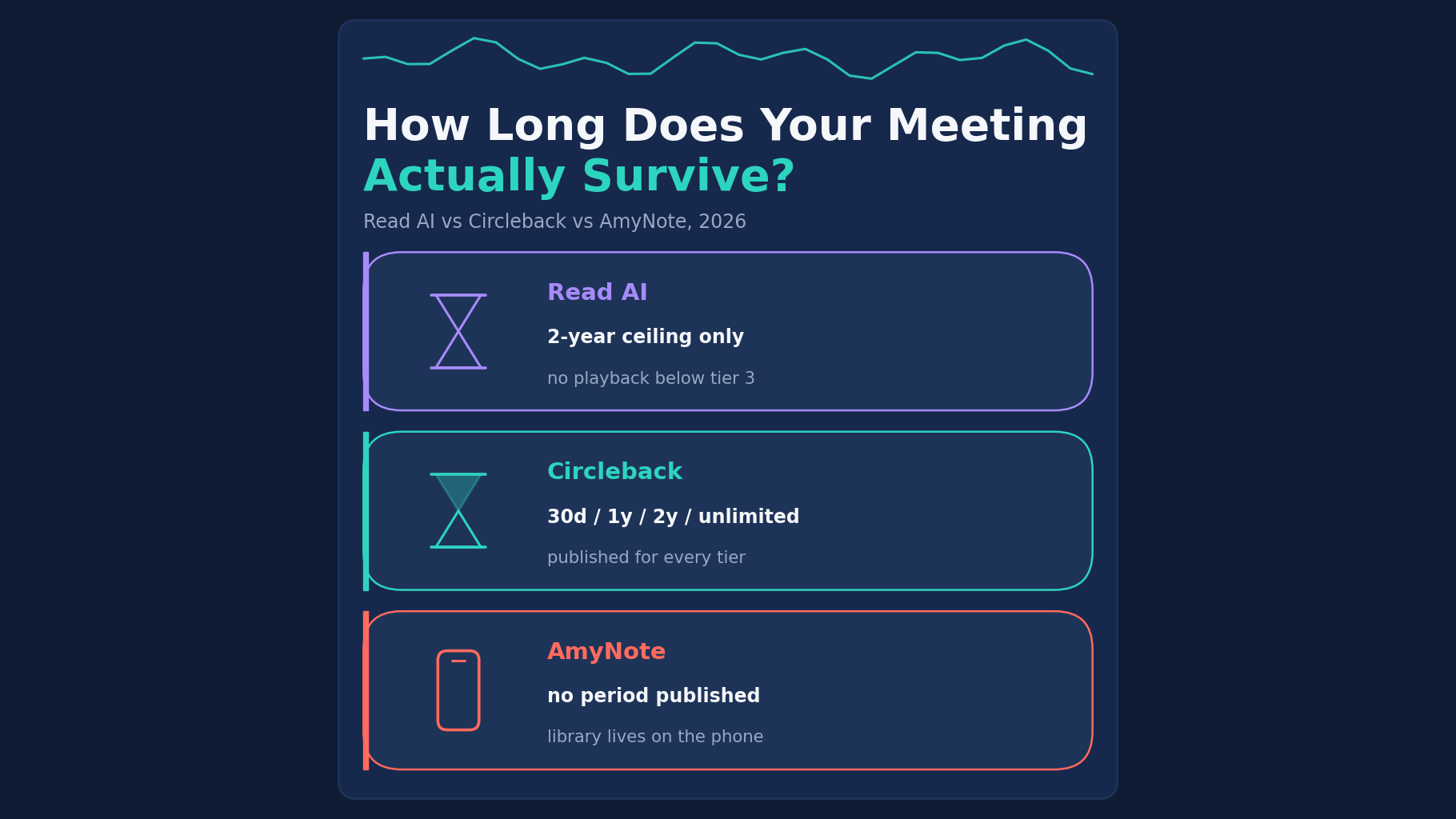
Strengths. Read AI runs on Windows, macOS, iOS, Android and a browser extension, joining Zoom, Teams and Meet. Its free plan never expires, and Pro costs $15 per user per month billed annually or $19.75 monthly. It is also the only vendor here that states a retention limit, keeping audio and video “in no case for longer than 2 years.”
The comparison table says Read meeting reports are available in Arabic, Chinese (Cantonese and Mandarin), Danish, Dutch, English, Finnish, French, German, Hindi, Italian, Japanese, Norwegian, Portuguese, Russian, Spanish and Swedish. That is sixteen, including four that Krisp lacks: Arabic, Chinese, Finnish and Japanese. For a team that meets with Tokyo, Shanghai, Hong Kong or the Gulf, that list is the stronger of the two.
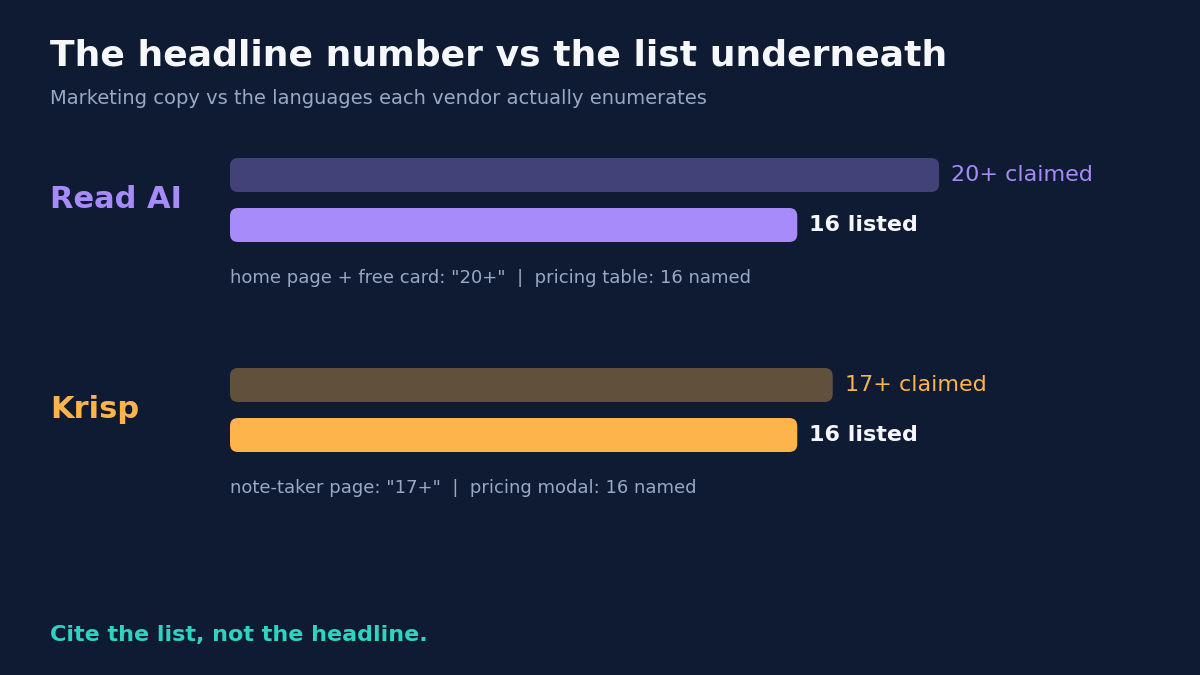
Weaknesses. The headline does not match the table. The home page says “Supports 20+ languages” and the free card says “20+ languages supported”, while the table beneath them says “Support for 16+ Languages” and names sixteen. Korean, Polish, Czech and Ukrainian are not among them.
Read AI says it uses “audio and visual information, as well as other information like language, to infer certain demographic characteristics about users.” Its Read Score “involves analyzing facial and verbal elements of all meeting attendees”, including people who never signed up. EU and UK users are exempt from the facial part only. For a buyer, that means the question is not only whether you are comfortable with the analysis, but whether the other people on your calls would be.
The free plan covers five transcripts a month, one hour each. Playback of the recording is excluded from Free and Pro. HIPAA, SSO and SCIM appear only on Enterprise+, which requires five licences.
Krisp: Korean and Central Europe, No Japanese or Chinese
Strengths. Krisp is the cheapest paid plan here: Core at $8 per user per month billed annually, or $16 monthly. It started as noise cancellation and still includes it on every plan. It captures calls without a bot (or with one, if you prefer), records in-person meetings and video, and runs on Windows, macOS, iOS, Android and a browser extension.
The pricing FAQ is unhedged on training: “Your meeting data is never used to train Krisp’s AI models.” Its language modal lists English, French, German, Italian, Dutch, Polish, Portuguese, Russian, Spanish, Hindi, Danish, Swedish, Norwegian, Czech, Ukrainian and Korean. That list is the better fit for Seoul, Warsaw, Prague or Kyiv.
Weaknesses. Krisp has the same headline problem as Read AI. The pricing table says “Transcript & summaries in 16+ langs” and the modal names sixteen, while the note-taker page says “17+ languages supported for global meetings.” There is no Japanese, no Chinese and no Arabic.
Its privacy policy also treats non-English audio differently: “when non-English speech is detected in transcribe only mode, Krisp may automatically record the relevant audio content of your meeting in order to enable multilingual transcription.” In fairness, that audio is deleted once the transcript exists. But a buyer who chose transcribe-only to avoid recordings should know the rule changes for a meeting in Spanish. If your internal policy says “no audio recordings,” this is the sentence to show whoever wrote that policy before you roll Krisp out to a multilingual team.
There is no free plan, only a seven-day trial. Signup requires a Google or Outlook calendar connection by default. Core storage is 10 GB. HIPAA is Enterprise only, and BAA signing is available for teams with 100+ seats.
AmyNote: Beyond Both Lists, iPhone Only
Strengths. AmyNote says it transcribes 140+ languages and translates into 100+, and says it is optimized for East Asian languages and Arabic. Its language strip names Simplified Chinese, Traditional Chinese, Japanese, Korean, Arabic, Thai, Turkish, Ukrainian and Vietnamese, so Japanese, Chinese and Korean sit in one app, which neither competitor’s list manages. Translation is included in the price, not sold separately.
It needs no hardware for in-person conversations and no bot for calls. Its security page names Microsoft Azure and OpenAI for speech recognition and Anthropic’s Claude models for analysis, and says “We don’t use your data to train AI models” and “We don’t require an account to use core features.” It scores no attendee. Pricing is $12.99 weekly, $19.99 monthly or $99 yearly.
Weaknesses, stated plainly. AmyNote is iOS only: no Android, Windows or Mac app, while both competitors run on all four. There is no free tier, only a three-day trial, against Read AI’s permanent free plan. Billed monthly, it is the most expensive of the three at $19.99, above Read AI Pro at $19.75 and Krisp Core at $16. Krisp Core is also $3 cheaper for the first year.
It publishes no retention period, while Read AI publishes two years. Its library is local-first on the phone, but that is not local-only: audio or text sent for transcription or translation may be kept on its cloud infrastructure while it is processed. It uses TLS in transit and specifically does not call that end-to-end encryption. It holds no SOC 2, ISO 27001, HIPAA or GDPR certification, and sells no SSO or SCIM at any price. No CRM integration and no video recording.
Side by Side
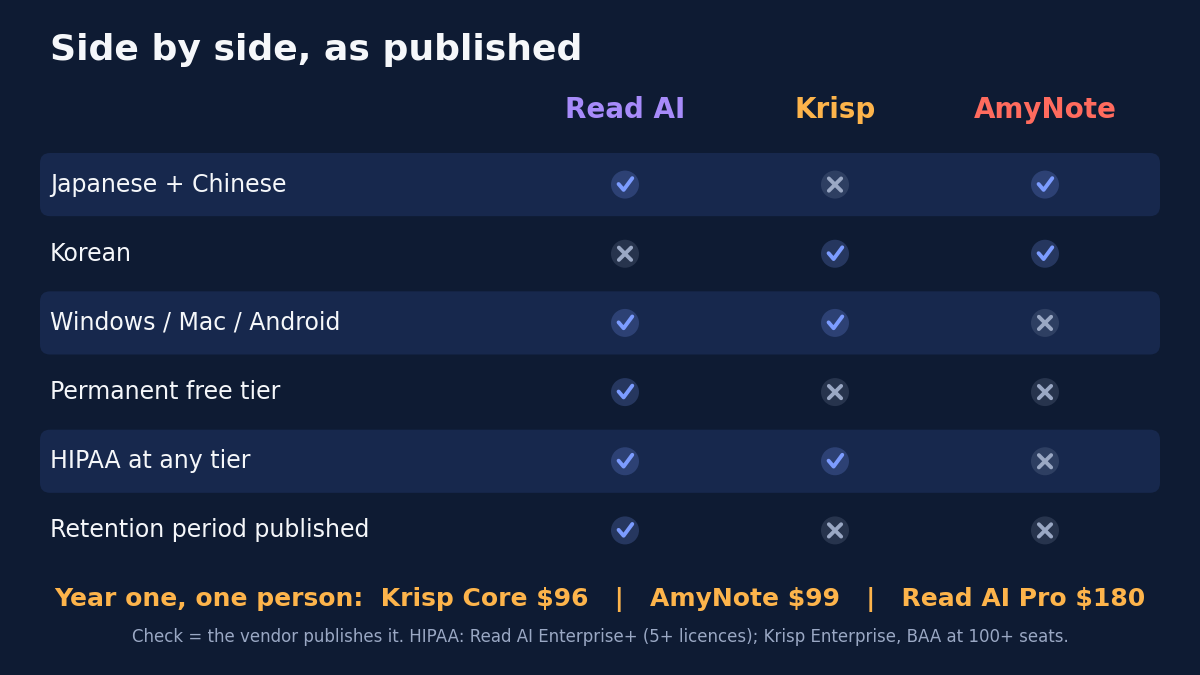
- Languages actually enumerated. Read AI 16, Krisp 16, AmyNote 140+ claimed.
- Japanese and Chinese. Read AI yes. Krisp no. AmyNote yes.
- Korean. Read AI no. Krisp yes. AmyNote yes.
- Headline versus list. Read AI 20+ against 16. Krisp 17+ against 16. AmyNote 140+, no shorter list published.
- Permanent free tier. Read AI yes, five transcripts a month. Krisp and AmyNote trial only.
- HIPAA. Read AI on Enterprise+ only. Krisp on Enterprise, BAA at 100+ seats. AmyNote none.
- Year one, one person. Krisp Core $96. AmyNote $99. Read AI Pro $180.
How to Check a Language List Before You Buy
The lesson generalises beyond these three products. When a vendor’s language support matters to you, a few minutes of checking saves a failed rollout.
- Find the enumerated list, not the number. It is usually in a pricing-page table, a modal or a help article. If a vendor only publishes a number, treat that as unknown.
- Write down your actual languages. Not the languages of your company, but the languages spoken in the meetings you want captured, including the ones that only come up with one client or one region.
- Read the privacy policy for language-specific rules. As Krisp shows, a vendor may handle non-English audio differently from English, and the pricing page will not tell you.
- Test with a real mixed-language meeting during the trial. A list tells you what is supported, not how well a meeting that switches languages mid-sentence comes out.
The Bottom Line
Read AI and Krisp both list sixteen languages, and each is missing four that the other has. For a team working only in Western European languages, either will do, and Krisp is the cheaper of the two. For a team working in Japanese or Chinese, Read AI is the only one of the two that covers them. For Korean, only Krisp does.
A team that needs Japanese, Chinese and Korean together is not served by either list. That is where AmyNote fits, as long as everyone is on an iPhone and nobody needs an enterprise certification. Before paying, check the enumerated list against your meetings, not the headline number.
Originally published as an X Article by @AmyNoteApp.