You interview a source for forty minutes across a café table. A week later, an editor questions one line: did they say “we knew” or “we heard”? The transcript says one thing. The only thing that settles it is the recording.
For anyone who interviews people for a living, whether reporters, researchers or recruiters, the best AI note-taker is the one that still has the audio when you need it. Most roundups rank these tools on summaries and integrations. This one ranks them on the tape. Every figure below was read off the vendors’ own pages on 26 September 2026, and prices and plans change, so check them again before you buy.
Quick Picks
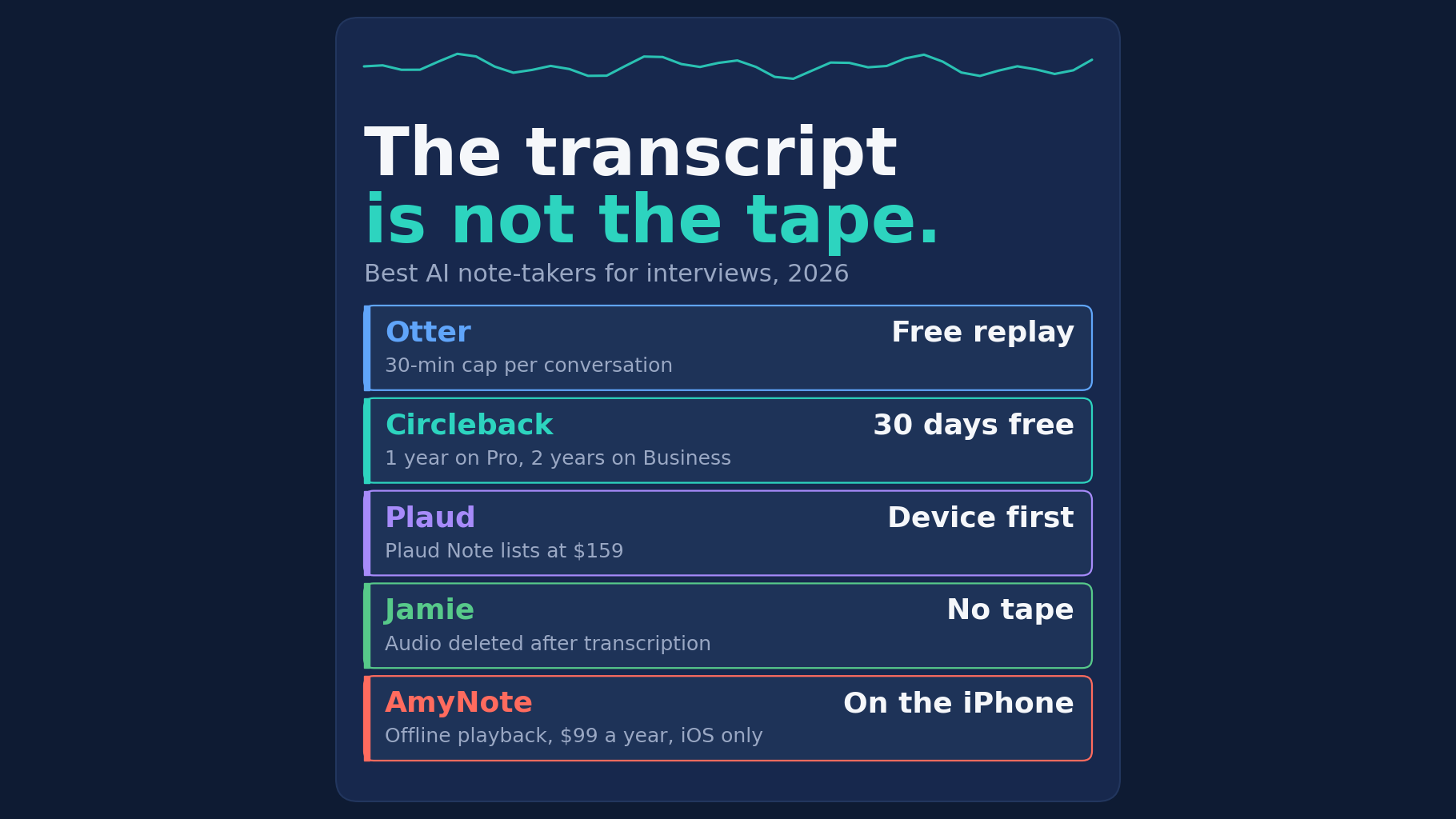
- Otter if you want a free plan that plays back audio on iPhone, Android and desktop, and your interviews run under 30 minutes.
- Circleback if you want free in-person capture from a phone or Apple Watch, and a 30-day window to re-listen is enough.
- Plaud if you want a dedicated recorder with published compliance certifications, and don’t mind buying a device first.
- Jamie if strict European privacy matters more than replay, because it deletes the audio after transcribing it.
- AmyNote if you interview on an iPhone and want the recording kept and playable offline for a flat yearly price.
What an Interviewer Needs
Meeting tools are usually judged on summaries and integrations. An interview asks different questions:
- Can it record a person across the table? No meeting link and no bot joining.
- Does it keep the audio, and for how long? A transcript can’t be checked against itself. Speech recognition is good, but a single misheard word in a quote is exactly the kind of error that only the audio can catch.
- Will a long interview fit? Some plans cut off at 30 minutes, which is shorter than most sit-down interviews.
- What happens to your source’s words? Whether the vendor says it trains AI models on them. For a source who spoke on background, that is not an abstract question.
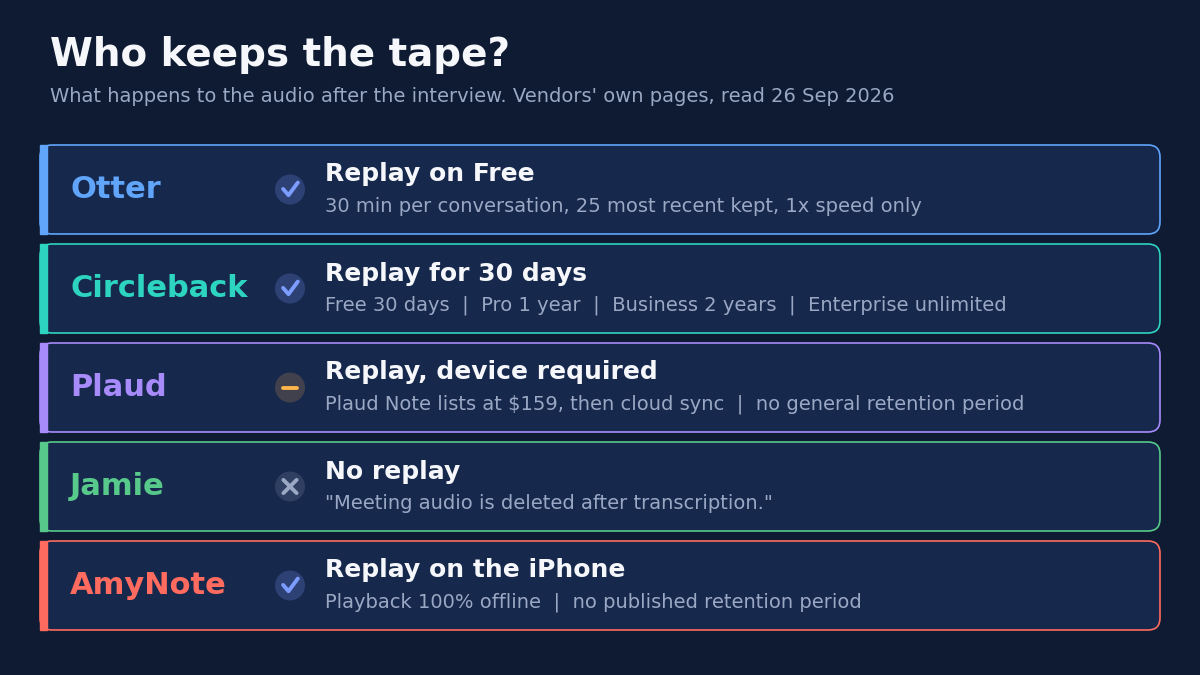
Otter: Free Replay, 30-Minute Ceiling
Strengths. Otter’s free Basic plan includes the iOS and Android apps, live transcription, speaker identification and “Audio recording playback”. It also runs on Mac and Windows. Pro costs $8.33 per user per month billed annually and raises the per-conversation limit to 90 minutes. Business, at $19.99, allows four hours.
Weaknesses. Basic stops each conversation at 30 minutes. It has 300 minutes a month in one shared pool, keeps the 25 most recent conversations, and plays back at 1x speed only. Otter transcribes six languages. For source work, the privacy policy matters most. It lists “training our proprietary AI technology on de-identified audio recordings and on transcriptions (which may contain Personal Information)”, and we found no training opt-out in it. It keeps data “for as long as necessary”, with no fixed period.
Best for: short phone-side interviews where you want replay on every device and can live with the training language.
Circleback: Free In-Person Capture, 30 Days of Tape
Strengths. Circleback’s free plan offers “Unlimited meetings” and “Mobile and Apple Watch apps for in-person meetings”, with speaker-labeled transcripts. It also has desktop apps for online calls. Its FAQ says plainly: “No. We don’t train AI models on customer data.”
Weaknesses. The free plan keeps a “30-day meeting and recording history”. Pro, at $15 per user per month billed yearly, keeps “1 year of recording storage”. Business, at $25, keeps two years, and unlimited storage and HIPAA come only with Enterprise at $35. If a story is challenged after that window, the recording may be gone. Circleback is cloud-based, and prices are per user.
Best for: interviewers who want the clearest published answer to “how long is the audio kept,” and who will export anything they need to keep longer.
Plaud: A Dedicated Recorder, Device Required
Strengths. Plaud is built for recording in person. Its compliance line is the strongest here: “ISO 27001, ISO 27701, GDPR, SOC 2 Type II, HIPAA, and EN 18031 Compliant.” Its privacy policy says it will “never use your Content ... to train” AI models without explicit prior consent. It supports 112+ languages and includes cloud sync with unlimited storage.
Weaknesses. The device isn’t optional. The FAQ says “Every Plaud device includes the Starter Plan,” and the Plaud Desktop app is marked “(Requires Device)”. The Plaud Note lists at $159, and some other models were on sale when we checked. Starter includes 300 transcription minutes a month. Pro costs $99.99 a year for 1,200 minutes, and Unlimited costs $239.99. That’s another gadget to carry and charge, and Plaud publishes no general retention period.
Best for: organizations that need a certification to show procurement and are happy to hand out hardware.
Jamie: Strong Privacy, but No Tape
Strengths. Jamie records without a bot, and its pricing table marks “In-person meetings” as included on every tier, including Free. It runs on Mac, Windows and iPhone, supports 99+ languages, and stores data in Europe. It states: “Your data is never used for training of models, not by us or any of the model providers.”
Weaknesses. For interviews, the key line is on its security page: “Meeting audio is deleted after transcription.” That’s good for privacy, but it means there’s no recording to check a disputed quote against. The free plan allows 10 AI notes a month with a 30-minute limit per meeting. Plus costs €21 a month billed annually, with a two-hour limit. Pro, at €39, allows five hours.
Best for: conversations where holding no audio at all is the point, such as sensitive internal meetings, rather than on-the-record interviews.
AmyNote: iPhone Recording With Offline Replay
Strengths. AmyNote is an iPhone app that records the conversation in front of you, with no bot and no extra hardware. Its security page lists “Recording & Playback” as “100% offline — no network required”, and saved notes stay on the device. It transcribes 140+ languages and translates into 100+, with East Asian languages and Arabic a stated focus. You name a speaker once and it remembers them in later recordings, which helps with repeat sources. The security page says “We don’t use your data to train AI models” and “We don’t require an account to use core features.” It costs $99 a year, $19.99 a month or $12.99 a week, with every feature included.
Weaknesses, stated plainly. AmyNote is iOS only, with no Android, Mac or Windows app. There’s no free plan, only a three-day trial. Otter Pro costs about the same per year and runs everywhere. AmyNote publishes no retention period. Saved notes are stored on the device first, but not only there: audio sent for transcription or AI may be kept as a processing copy on its cloud infrastructure. It uses TLS in transit and doesn’t call that end-to-end encryption. It holds no SOC 2, ISO 27001 or HIPAA certification, and it records audio only.
Best for: an interviewer on an iPhone who wants the tape on their own device, replayable on a plane or in a courtroom hallway with no signal.
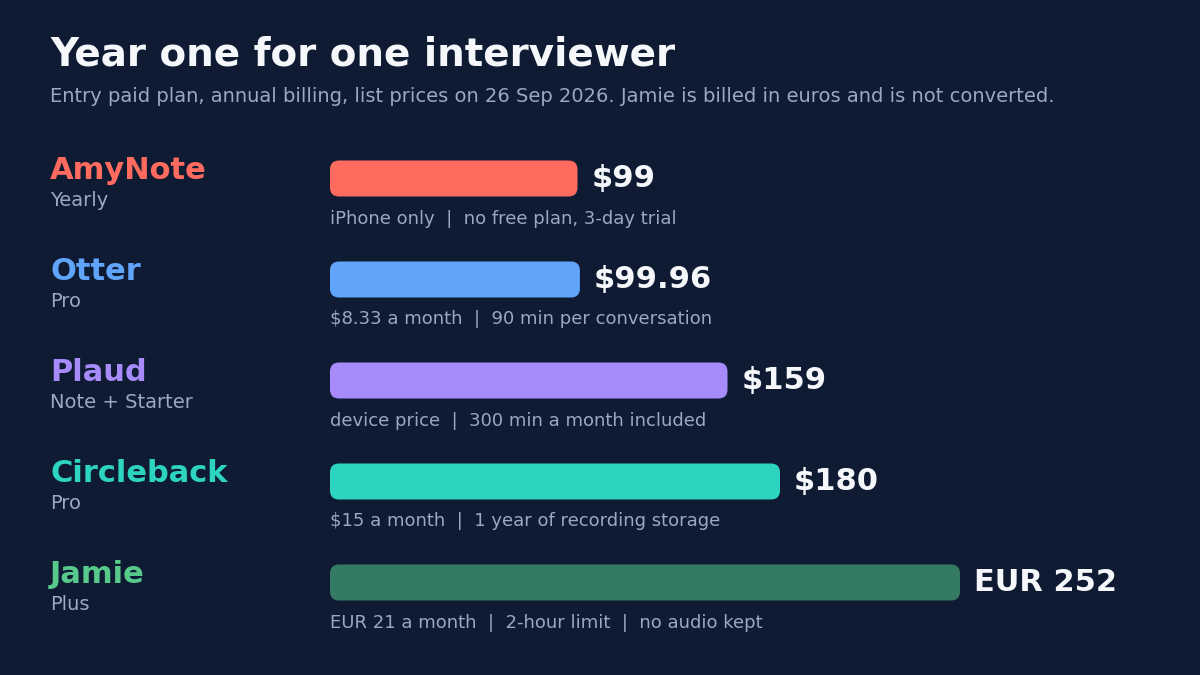
What Year One Costs
For one person on the entry paid plan with annual billing, list prices on the day we checked:
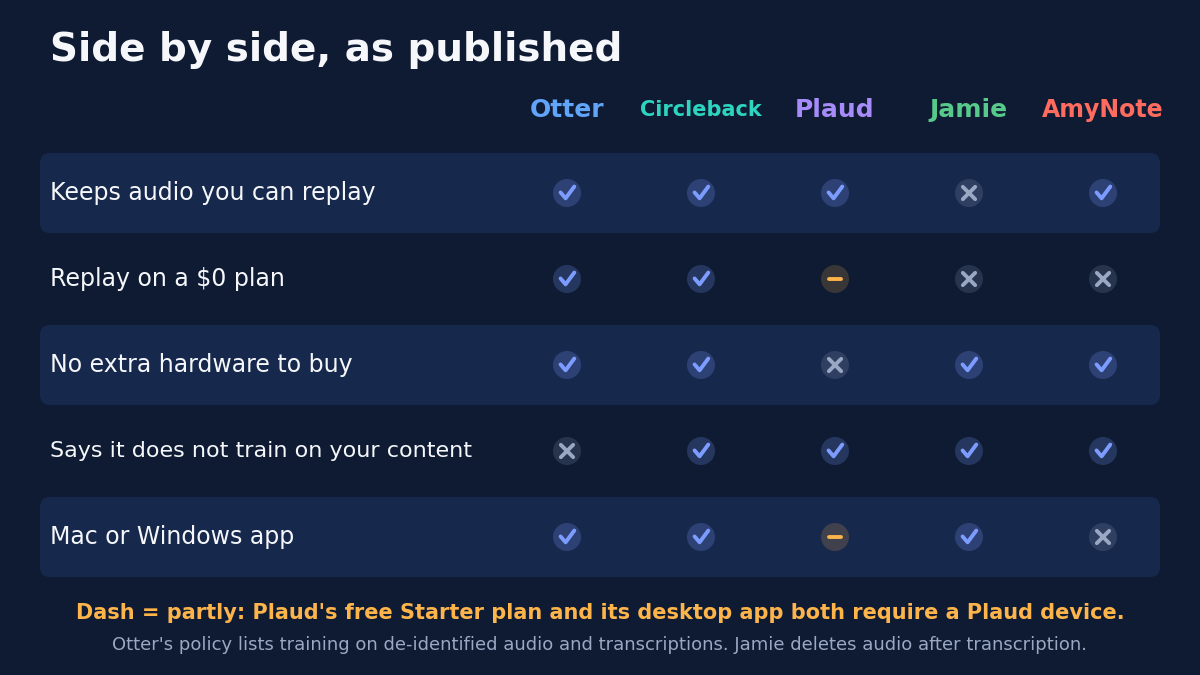
Side by Side
| Otter | Circleback | Plaud | Jamie | AmyNote | |
|---|---|---|---|---|---|
| Keeps audio you can replay | Yes | Yes | Yes | No | Yes |
| Replay on a $0 plan | Yes, 30-min cap | Yes, 30 days | Partly, device required | No | No, 3-day trial |
| No extra hardware | Yes | Yes | No | Yes | Yes |
| Says it does not train on your content | No | Yes | Yes | Yes | Yes |
| Mac or Windows app | Yes | Yes | Partly, device required | Yes | No |
How to Choose
- Replay on a free plan: Otter (30-minute cap) and Circleback (30 days).
- No replay at all: Jamie, by design.
- Published recording-storage ladder: only Circleback prints one, from 30 days on Free to unlimited on Enterprise.
- No training on your content: Circleback, Plaud, Jamie and AmyNote say so. Otter’s policy lists training on de-identified audio.
- Year one for one person: AmyNote $99, Otter Pro about $100, Plaud $159 including the device, Circleback Pro $180, Jamie Plus €252.
- Certifications: Plaud leads. AmyNote holds none.
Before You Record Anyone
Whichever tool you pick, the habits matter more than the app:
- Ask on the recording. Tell the person you are recording and get their agreement at the start, so the consent is on the tape itself. Recording-consent rules differ between jurisdictions, and some require every party to agree.
- Check the length limit before you sit down. A plan that cuts off at 30 minutes will do it mid-answer.
- Know where the file will live. On the device, in the vendor’s cloud, or deleted after transcription. Tell a sensitive source the truth about it.
- Export what you must keep. If your story or study may be challenged after the vendor’s retention window, keep your own copy of the audio.
- Check quotes against the audio, not the transcript. That is the whole reason to keep the tape.
The Bottom Line
If you ever have to defend a quote, check two things before choosing: whether the tool keeps the audio, and for how long. Jamie deletes it, Circleback’s free plan keeps it for a month, and Otter’s free plan cuts off at 30 minutes. AmyNote suits one kind of interviewer: someone on an iPhone who wants the tape kept on their own device for one flat price. If you need Android, a free plan or a compliance certificate, look at the others first.
Originally published as an X Article by @AmyNoteApp.